
What's happening
The Connection not completed before timeout error means your integration could not establish a connection to your Fishbowl server within the allowed time limit. If you're seeing this error when orders try to sync to Fishbowl, this article explains what's causing it and how to fix it. You may also see an order highlighted in red in your order list — when you open or edit it, a red error message appears above the order.
How do I know this is the error I'm encountering?
The error message will look something like this:
Sync error: System.Exception: Connection not completed before timeout at WebNinja.Fishbowl.Handler.ProcessFbijsonTasks(FbijsonTask[] fbijsonTasks, String host, String key)
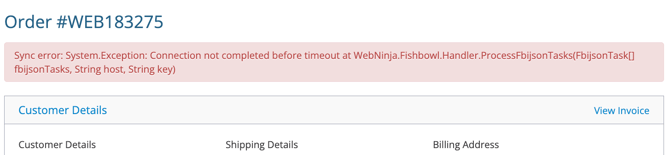
Why does this error occur?
This error originates on your end, not ours. It occurs when your Fishbowl server is unreachable — this could be caused by something affecting access to Fishbowl's database, or by something on the Fishbowl server itself blocking the connection entirely.
It can show up either randomly when some orders sync fine and others don't, or it can hit every order placed since a specific time. If you're seeing the pattern repeat at the same time of day, that's a strong clue that something on your server (or network) is doing the same thing on a schedule.
How do I resolve the connection not completed before timeout error?
-
Resync the failed orders first. In our experience, this resolves the issue most of the time - the error is usually temporary unless every order has been failing for many hours or days. Follow the steps in How to Resync an Order That Failed to Sync.
-
If resyncing doesn't fix it, dig into the pattern.
-
Check when the errors started. If they appear random, look for a consistent time of day they happen.
-
Restart your Fishbowl server, then resync the errored orders again.
-
Contact your Fishbowl partner. Ask if they see any activity or action happening in your Fishbowl consistently at the same time of day the errors hit.
-
If your Fishbowl partner doesn't find anything, check with your IT team. Ask whether any scheduled jobs, maintenance tasks, backups, or network events are running at those times that could affect connectivity to your Fishbowl server.
-
After each step, resync the errored orders again using the same resync process.
-
How can I prevent this error going forward?
-
Keep an eye on the timing. If you notice the error tends to hit at the same time of day, that's the signal something scheduled on your server or network is interfering. Identifying and adjusting that schedule prevents future occurrences.
-
Coordinate with your Fishbowl partner on server maintenance. Big database operations, backups, or maintenance windows can lock Fishbowl long enough to trigger the timeout. Schedule those for off-hours when orders aren't actively syncing.
-
Monitor your local network reliability. Connectivity hiccups between your Kinein site and your Fishbowl server are the most common trigger. If you've had intermittent network issues, sorting those out will reduce these errors too.
Still Stuck?
If you've worked through all the steps above and you're still getting this error, shoot us an email at support@kinein.com and we'll dig in with you. Please note that our support team will work through these same steps with you, so completing them first will speed up the resolution process.